Robotics, AI & STEM for Classes II–VIII

A complete hands-on programme: student books, learning kits, teacher training and continuous academic support, built on a class-by-class curriculum.

Classes 2–8

Robotics & AI for every student

Our Robotics & AI programme helps students become creators, innovators and problem solvers. Through hands-on projects and real-world challenges, they build 21st-century skills that go beyond textbooks.

1 kit per 100 books

Every school receives age-appropriate learning kits with the books, and can add more kits whenever needed.
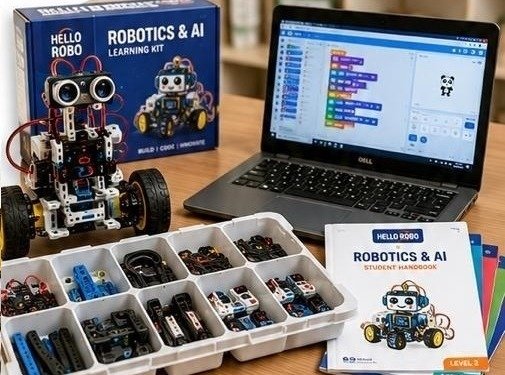
Hello Robo Robotics and AI learning kit with robot, parts tray, laptop and student handbook

Robotics

Design, build and program robots.

Artificial intelligence

Understand AI concepts through activities.

Coding

Learn to code using block-based and text-based tools.

Engineering design

Apply engineering principles to real problems.

Problem solving

Build logical thinking and analytical skills.

Innovation & creativity

Encourage creativity, curiosity and innovation.

Programme structure

Classes II–IV

Junior programme

Build · Explore · Create

Early exposure to robotics concepts through play-based and activity-driven learning.

Classes V–VIII

Senior programme

Design · Code · Innovate

Advance to coding, AI concepts and real-world problem solving with exciting projects.

Students learn to

  • Design and build robots
  • Understand AI concepts
  • Write code and programs
  • Work with sensors & motors
  • Solve real-world problems
  • Apply computational thinking
  • Think creatively
  • Work in teams
  • Present and communicate ideas
Coming soonWatch the programme in actionClassroom video coming soon
Pricing on request

Grade-wise book pricing is shared with each school individually. Book a consultation and our team will send you a detailed proposal.

Request pricing

Curriculum 2027–28 · Classes II–VIII

Syllabus progression: STEM, Robotics & AI

Each class builds from exploring and making towards coding, AI, connected devices and integrated projects. Every book has 10 chapters, supported by teachers’ handbooks with lesson plans and project details.

Classes II–III

Explore and describe

Notice patterns, investigate everyday science, make simple models and explain observations.

Classes IV–V

Build and control

Learn components, plan circuits, simulate and code outputs, then test and improve designs.

Classes VI–VIII

Integrate and apply

Connect AI, sensors, code, wireless systems, apps and robotics projects to solve problems.

Class-by-class curriculum

Tap a class to see its chapters, learning outcomes, skills and hands-on highlights.

Class IISTEM–AIExplore and describe

Chapters

  1. 01Robotics (Artificial Intelligence)
  2. 02Shapes Around Us
  3. 03Science Around Us
  4. 04Maps & Directions
  5. 05Magnetism
  6. 06Power of Air
  7. 07Electrical Energy
  8. 08Working of Buzzer
  9. 09Electronic Card
  10. 10Projects (Robotics & 3D Models)

Learning outcomes

Recognise robots, their parts and guided AI tools; explore shapes, directions and everyday science; investigate simple forces and materials; build low-voltage circuits, an electronic card and introductory models.

Skills developed

ObservationSpatial reasoningFollowing directionsPrediction and testingSafe tool use

Hands-on highlights

  • Discover robot parts and try drawing-recognition AI tools
  • Tangram, shape and 3D-pen making workshops
  • Magnet car, balloon car and float-or-sink investigations
  • Buzzer circuit, electronic greeting card and WitBlox models
Class IIISTEMExplore and describe

Chapters

  1. 01Artificial Intelligence (Using AI Tools)
  2. 02Transformation (2D to 3D)
  3. 03Science Behind (Solutions in Water)
  4. 04Magnetism
  5. 05Static Electricity
  6. 06Renewable Energy (Sunlight)
  7. 07Using Breadboard
  8. 08Playing with Buzzer
  9. 09Playing with DC Motor
  10. 10Projects (Robotics & 3D Models)

Learning outcomes

Use guided AI tools to plan a visual story; transform 2D nets into 3D forms; investigate solutions, magnets, static effects and solar energy; build simple circuits and robotics models.

Skills developed

Creative thinkingSpatial reasoningObservationCircuit awarenessMaking and explaining

Hands-on highlights

  • AI-assisted storyboard of a classic story
  • Fold nets into cubes and cylinders
  • Electromagnet, static electricity and solar cell experiments
  • Breadboard water-level alert, motor models and WitBlox doorbell
Class IVRobotics & AIBuild and control

Chapters

  1. 01Robots and AI
  2. 02Circuits Using Breadboard
  3. 03Introduction to Tinkercad
  4. 04Robotics Components
  5. 05Light Emitting Diode
  6. 06Switch & Its Types
  7. 07Electronic Circuits
  8. 08Working of a DC Motor
  9. 09Create & Print 3D
  10. 10WitBlox – Robotics Projects

Learning outcomes

Describe robot tasks and introductory AI; recognise components and build or simulate simple circuits; use basic design tools to create 3D models and modular robotics projects.

Skills developed

Technology vocabularyComponent recognitionSequencingCircuit buildingDesign and testing

Hands-on highlights

  • Prompt-to-image AI exploration
  • Breadboard traffic light and circuit simulation in Tinkercad
  • Doorbell, lift and wind-powered car builds
  • Design and 3D-print a die or chess pawn
Class VRobotics & AIBuild and control

Chapters

  1. 01AI – Training Machines
  2. 02Robotics Components
  3. 03Tinkercad – Robotics Circuits
  4. 04Introduction to Arduino
  5. 05Robotics Coding I
  6. 06Coding with Lights
  7. 07Coding with Buzzer
  8. 08Coding with Potentiometer
  9. 09Create & Print 3D
  10. 10WitBlox – Robotics Projects

Learning outcomes

Train and test recognition models; identify circuit components and Arduino functions; code light, sound and input behaviours; create a 3D design and use modular robotics blocks.

Skills developed

Pattern recognitionElectronicsAlgorithmsCoding and debugging3D design

Hands-on highlights

  • Train a Face Lock AI model and try speech recognition
  • Code traffic lights, Diwali lights and RGB colours on Arduino
  • Control tones, brightness and fan speed with a potentiometer
  • Design an aeroplane or toy car for 3D printing
Class VIRobotics & AIIntegrate and apply

Chapters

  1. 01Revealing Innovation
  2. 02Machine Learning
  3. 03AIoT Integration
  4. 04Robotics Circuits I
  5. 05Robotics Coding I
  6. 06Innovate with Servo Motor
  7. 07Playing with IR Sensor
  8. 08Using 7-Segment Display
  9. 09WitBlox – AI Projects
  10. 10Bambu Studio – 3D Projects

Learning outcomes

Apply design thinking and data concepts; train and test machine-learning models; connect AI ideas to devices; simulate and code Arduino circuits; control servo, sensor and display outputs; prepare AI and 3D projects.

Skills developed

Problem framingModel testingComputational thinkingElectronics and codeInterpreting inputs and outputs

Hands-on highlights

  • Build a voice tuner and explore chatbots
  • Train image, sound or pose AI models
  • Servo door lock, touchless doorbell and 7-segment counter
  • AI Vision smart gate, robotic hand or smart dustbin
Class VIIRobotics & AIIntegrate and apply

Chapters

  1. 01Revealing Innovation
  2. 02AIoT Integration
  3. 03Machine Learning
  4. 04Robotics Circuits II
  5. 05Robotics Coding II
  6. 06Coding with Keypad
  7. 07Coding with LDR Sensor
  8. 08Coding with Ultrasonic Sensor
  9. 09WitBlox – AI Projects
  10. 10Bambu Studio – 3D Projects

Learning outcomes

Plan and test ideas; relate AI to connected data; evaluate model predictions; build on circuit and coding skills with keypad and sensor inputs; prepare AI Vision and 3D projects.

Skills developed

Systems thinkingData and model evaluationInput/output reasoningCoding and debuggingDesign iteration

Hands-on highlights

  • Hand-gesture recognition AI model
  • Password-operated smart lock with keypad and LCD
  • Automatic night light and ultrasonic radar
  • AI Face project and a 3D-printed statue model
Class VIIIRobotics & AIIntegrate and apply

Chapters

  1. 01AI Project Cycle
  2. 02AI Model – Hand Gestures
  3. 03Go Wireless Using ESP32
  4. 04IoT – Remote Control
  5. 05Robotics Circuits & Coding
  6. 06Coding with LCD Displays
  7. 07Coding with Sensors
  8. 08Mobile App Development
  9. 09WitBlox – AI Projects
  10. 10Bambu Studio – 3D Projects

Learning outcomes

Use the AI Project Cycle to train and evaluate gesture models; explore ESP32 and IoT control; integrate circuits, code, displays and sensors; develop mobile app interfaces and apply AI and 3D workflows.

Skills developed

Project planningModel evaluationWireless systemsApp developmentHardware/software integration

Hands-on highlights

  • Control an LED and servo lock over the cloud with ESP32
  • Temperature, soil-moisture and motion sensor projects
  • Build Android apps, including a Bluetooth-controlled vehicle
  • AI Fire Alarm or AI Track & Shoot with the WitBlox AI Box

Tools and platforms students use

Students learn on the same kinds of boards and software used by makers and engineers.

Arduino UnoESP32 & IoT CloudTinkercadWitBlox & AI BoxScratchTeachable MachineMachine Learning for KidsMIT App InventorBambu Studio 3D printingSensors, servos & displays

Safe, teacher-led classrooms

  • Low-voltage circuits and only the parts each activity needs
  • 3D printers operated by the teacher, who handles hot and moving parts
  • Teacher-managed access to apps and AI tools
  • Students’ identifying information kept protected
Curriculum overview 2027–28

Download the full chapter-by-chapter syllabus progression for Classes II–VIII.

Download PDF
Also available · Classes 1–8

Discover CS computer books

A computer science book series that schools can add alongside the Robotics & AI programme, covering block coding, animation and game development. Details on request.

Ask about Discover CS

See the programme at your school

Book a free consultation. We’ll show the books and kit in action and recommend the right model for your classes.

Book a Future Skills Consultation